Hi, I'm Mikhail Ilin. I'm a random stuff engineer, indie maker and
solopreneur. Most of the things I like are related to web technologies, music
or design. I've founded Lopaka.app.
My GitHub, Twitter and
LinkedIn
-
Why I Built a Telegram Bot for OpenClaw
General ·In February I decided to try installing OpenClaw for myself and got completely hooked for several days because it turned out to be an incredibly fun toy.
I noticed that setting up and configuring all this stuff requires technical skills. Some people buy a Mac Mini, others rent a VPS. But either way, there’s no easy way to install everything without opening a terminal.
The claw’s creators did come up with some wizard and onboarding, but any unprepared person will get stuck as soon as they see the list of AI providers. There’s a serious barrier to entry, though it’s not insurmountable.
There are already plenty of sites offering one-click installation, but the thing about all these services is they look like some cringey portal into the Matrix. Like everything is designed for weird hackers with RGB keyboards, black hoodies, and a Flipper Zero on their shelf.
I just felt like there was a real lack of humanity in all of this. I see there’s demand, there’s interest, there are tons of offerings, and they’re all made for tech bros. Also, I couldn’t find a single service that could be launched without leaving Telegram. And Telegram, by the way, is the native interface for OpenClaw.
So…
-
My Failed Attempt to Build a Dictation Gadget
General ·I’ve been playing around with my app Dictant and wanted to build a mini gadget so I could walk away from my computer and dictate stuff. And have it inserted wherever I need it. Burned through a ton of tokens and learned a few things:
- Everyone who works on embedded device development, writes firmware for them, and deals with the Bluetooth stack is basically a god. I can’t imagine how anyone did this without AI.
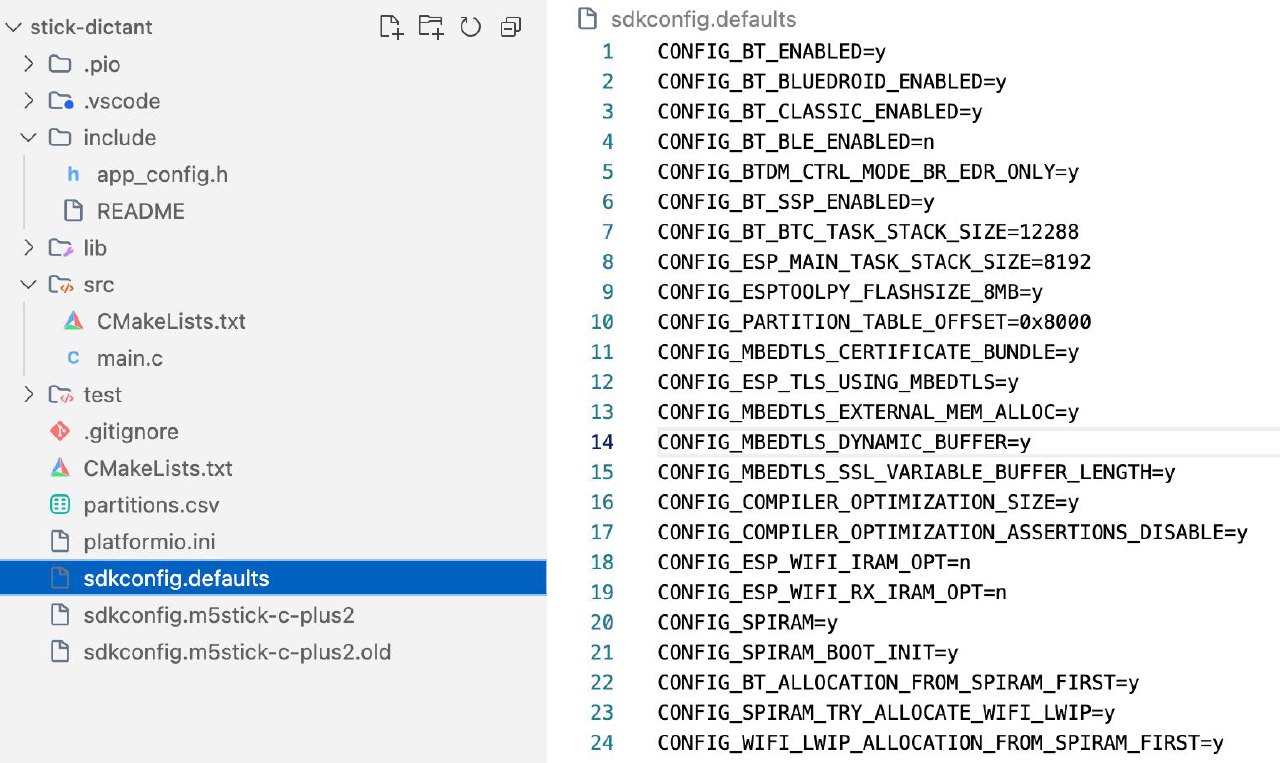
Just to connect a ready-made ESP dev board as a Bluetooth HID device to my computer, I had to create so many configuration files, fill in so many parameters — it’s insane!
Here’s a screenshot. There are like a dozen of these files. I have no idea what any of them do. I can’t imagine how anyone could fit all this in their head.
-
The M5 StickC PLUS2 is a neat little thing, but it’s completely unsuitable for this task. I couldn’t even fully get it running as a Bluetooth headset, and then found out it only supports super low quality audio, so I basically said screw it to using it as a Bluetooth mic.
-
Next I thought, maybe I can make it act as a keyboard. I configured it to upload recordings via WiFi to OpenAI, extract and transcribe the text, and then type it out as a keyboard.
Experienced folks already know where I messed up.
My whole idea of mixed Cyrillic and Latin input, the way Whisper does it, crashed into the reality of having to constantly switch input languages. You can’t just inject random text by pretending to be a keyboard. You can only send key codes, and the system converts those to text. So it doesn’t work the way I wanted.
Next steps:
I’ll have to embed the Bluetooth stack directly into Dictant. It’ll handle Bluetooth, receive text data from the device, and then the app can insert it into the input field. Think that’ll work?
-
OpenAI Symphony: Documentation Is the New Release
General ·OpenAI rolled out a new open-source project for agent orchestration in development. But that’s not the most interesting part — there are plenty of those.
The absolute fire in this repository is that they suggest we build and vibe-code the software ourselves from the spec!!!
There’s no source code, only a massive specification with instructions on what to do.
This is literally the next step. The future is already here. I was fantasizing about this six months ago, and now it’s happened.
The README literally says:
Tell your favorite coding agent to build Symphony in a programming language of your choice:
Implement Symphony according to the following spec: https://github.com/openai/symphony/blob/main/SPEC.md
And the README is super minimal — like, no developer instructions at all. It’s just… wow.
Before: documentation → code → release Now: documentation → release
What’s next? We won’t download hundreds of megabytes of software, just a 10-kilobyte specification? And it’ll get “compiled” by an LLM for our environment in a couple of minutes?
-
What I Actually Use OpenClaw For
General ·Glasha already tried to answer the question of what OpenClaw is, but I wanted to share my personal experience.
It’s basically a Telegram chat where I talk to my AI assistant. And here’s what she does:
-
Lead generation for Lopaka’s B2B direction. She searches for companies on Google, finds info through Perplexity, picks suitable ones, finds email addresses and contacts for the right people. Hits various APIs for email validation. End result: a contact database.
-
Email outreach. Based on that contact database, we write email sequences. Still semi-manual right now — I check who she’s writing to and give approval, but I plan to automate this process.
- Routine tasks, for example:
- I sent her an archive of images and asked her to make me a PDF. She handled it in one message. I just dropped the file in chat, and it was done.
- Needed to find all emails with a specific tag in my inbox and compile them into a spreadsheet. One request, and I had a ready CSV file.
-
Audio transcription via Whisper. Same deal — I drop an audio file, get a transcript.
-
Cross-posting to Twitter and Threads. I exported all posts from my Telegram channel as JSON, filtered out the junk. Glasha breaks posts into chunks twice a day, threads them, attaches images, translates to English.
- Running her own channel. This is a fun experiment: I initially prompt-engineered her a bit, gave her full freedom, and for every question told her to decide herself. And she did. Now she runs a channel based on what we discuss and what she comes across during work. I don’t even fully understand how it works on her end.
The most important thing is that I had a blast setting all this up. I was obsessed for several days, just vibing with the magic that suddenly started happening.
I often hear that all of this could’ve been done with n8n, that you could vibe-code it…
-
-
I Built Dictant — A Native Mac Dictation App
General ·I love dictating text for working with agents. And honestly, for chatting on Telegram too. I often dictate posts for this channel by voice. The only problem is that Apple’s built-in tools are terrible at recognizing Russian speech and even worse at punctuation — basically, using them is a pain. There are plenty of apps out there that can work with AI, even local models.
I already wrote about WhisprFlow, and there’s the popular MacWhisper app. And they all suck. They’re built on Electron, with cluttered garbage interfaces. You have to download gigabytes of junk.
So I started looking for something open-source, free, that I’d actually enjoy using with my own API keys.
I tried local models, and I didn’t like them. I don’t like the speed, I don’t like the quality, and especially the fact that local models handle multiple languages poorly. When I switch between Russian and English, it’s inconvenient.
Long story short, I built my own app — Dictant for Mac. Pure native SwiftUI, pure OpenAI Whisper model.
I hold down the right Command key and dictate text. Half a second later it gets inserted into the active input field. And a little indicator appears next to my cursor — red when it’s recording, green when it’s processing. The app lives in the system tray, menu on right-click. You can enable auto-copy to clipboard. Automatically recognizes all languages.
Open source, distributed as a pkg — you’ll need to go into Security settings to allow it. I’ve been using it for two months now, fixed most of the bugs.
https://github.com/sbrin/Dictant/releases
What do you think?